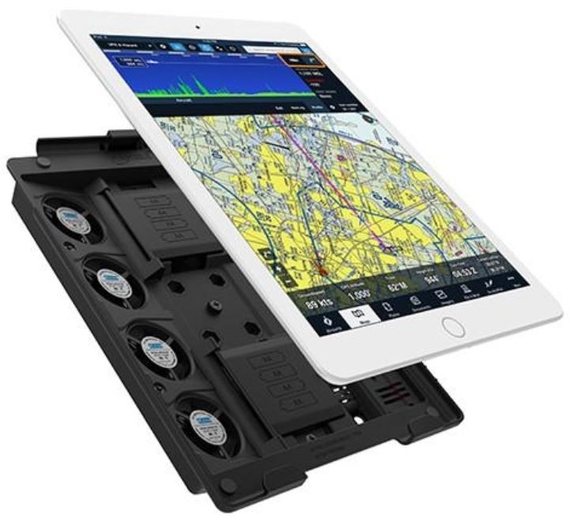
Active Cooling Mount

Active Cooling Mount

Για πλήρη ψύξη και φόρτιση του iPad

active cooling mount 2

Κατά καιρούς κάνουν την εμφάνιση τους gadgets στην αγορά τα οποία πραγματικά διεγείρουν την περιέργεια, είτε λόγω της εξαιρετικής χρησιμότητας τους, είτε λόγω του… αντίθετου. Μάλιστα, πολλά εξ’αυτών αφορούν τα smartphones ή tablets που έχουμε στην κατοχή μας.

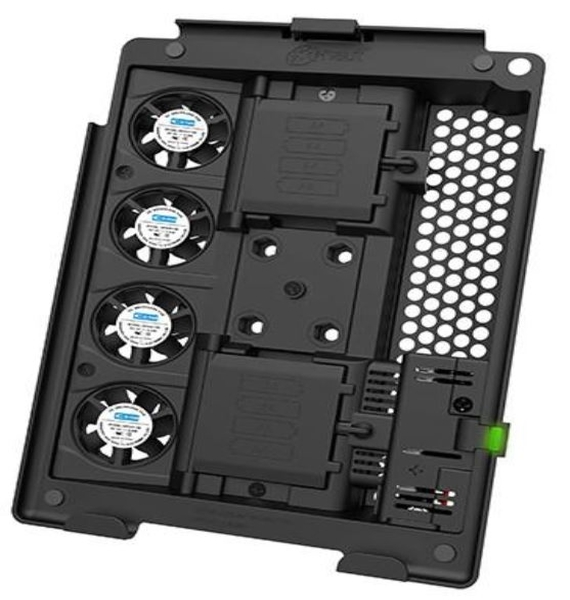
Ένα πολύ ενδιαφέρον gadget (που στον ελεύθερο του χρόνο παίζει και τον ρόλο της θήκης) είναι το Active Cooling Mount και απευθύνεται στους power users των iPads της Apple. Συγκεκριμένα, το προϊόν ενσωματώνει τέσσερα ανεμιστηράκια και υποδοχές για οχτώ AA μπαταρίες, ώστε το tablet σας να μην υπερθερμανθεί, αλλά ούτε και να “μείνει” από μπαταρία. Το gadget τοποθετείται στο πίσω μέρος του iPad / iPad Mini και υπόσχεται να διατηρήσει την χαμηλή θερμοκρασία και την μπαταρία της συσκευής όσο εσείς την χρησιμοποιείτε.

active cooling mount 1

Η εταιρεία που κρύβεται πίσω από την κατασκευή του Active Cooling Mount, η X-Naut, υποστηρίζει πως το συγκεκριμένο module αφορά κυρίως επαγγελματίες που χρησιμοποιούν τα Apple tablets τους για πλοήγηση drones. Αν κάποιος κρατάει το iPad του για αρκετή ώρα στον ήλιο, ενώ οδηγάει ένα drone, η συσκευή θα μπορούσε σύντομα να υπερθερμανθεί και φυσικά να μείνει με ελάχιστη εναπομείνασα μπαταρία. Και τα δύο ενδεχόμενα θα οδηγούσαν στην αναγκαστική απενεργοποίηση της ταμπλέτας. Τα προβλήματα αυτά όμως μπορούν να αποτελέσουν παρελθόν με το Active Cooling Pad.

Αν θέλετε να αποκτήσετε το gadget της X-Naut, θα πρέπει να καταβάλετε το ποσό των 180 δολαρίων αν έχετε στην κατοχή σας ένα iPad Mini. Αν χρησιμοποιείτε οποιοδήποτε iPad Air ή το 9.7″ iPad Pro (τα Pro 10.5″ / 12.9″ δεν υποστηρίζονται), θα πρέπει να πληρώσετε το ποσό των 200 δολαρίων. Πάντως, όσο παράξενο ή άσχημο και αν φαίνεται, το Active Cooling Mount μπορεί να λύσει δύο υπαρκτά προβλήματα, που εμφανίζονται ταυτόχρονα υπό συγκεκριμένες συνθήκες, για τα οποία δεν υπήρχε αντίστοιχη (ταυτόχρονη) πρόταση νωρίτερα.

Google Play Protect’ Android Security Suite Is Now Rolling Out

Google Play Protect’ Android Security Suite Is Now Rolling Out

Image result for google play protect

Google made a big deal of the new Google Play Protect system at this year’s Google I/O event, citing it as a strengthening of Android security. After a few months of waiting, Google Play Protect is beginning to roll out to devices. However, this isn’t actually a new system; it’s just a new way to present the features that were already there.

Play Protect encompasses several features that were completely separate until now. There’s malware scanning, lost phone tracking and locking, and Chrome Safe Browsing. The anti-malware features leverage Google’s machine learning platform to monitor apps for suspicious behavior, removing them from your phone before they can cause damage. You may be perplexed, wondering if Android had built-in malware scanning before. Yes, it did, but Google was very bad at making that known.

Android’s antivirus capabilities were first deployed on devices in 2013 when Jelly Bean was still the latest and greatest. At first, it only scanned apps as they were installed, but the service moved to a continuous-scanning model in 2014. Thus, even an app that didn’t look dangerous at installation could be caught red-handed if it tried to download a malicious module later. The only visible evidence of this system working was deep in the system settings, so few users even knew it was a thing.

Even though Google had its own malware scanning platform, alternative apps like Lookout, McAfee, and AVG have been some of the most popular downloads in the Play Store. Why? They are visible and proactive about device protection, sometimes to the point of being annoying and causing system slowdowns. Still, Google is taking some lessons from these apps by making Verify Apps more visible as part of Google Play Protect.


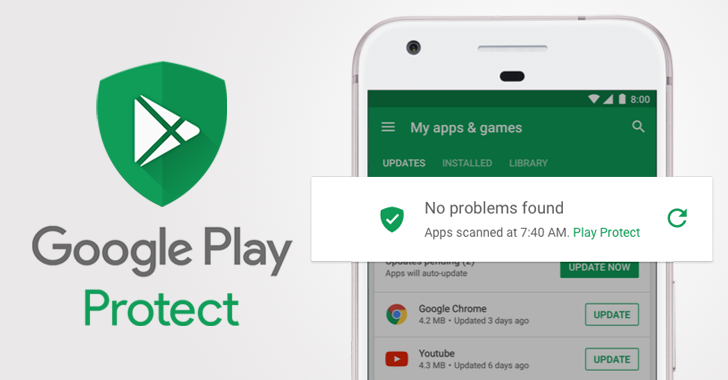
Like Verify Apps, the new Play Protect features will be delivered to virtually all Android devices by a Play Services update. This happens silently in the background, so you may already have the updated version. Play Protect is featured prominently at the top of your installed app list inside the Play Store. It shows you when the last scan was and confirms it found no problems. If there is a problem, the app is removed and you get a notification. The button in the app list lets you rescan apps, and a Googler I talked to confirms this does actually rescan apps — it’s not just a placebo. There is also a revamped Play Protect menu in the settings that shows recently scanned apps, system status, and lets you turn off protection (you shouldn’t).

The rollout is in full swing, so you probably already have the new version of Google’s security suite. Check the Play Store “My apps & games” page to find out.


The best tablets you can buy in 2017

The best tablets you can buy in 2017

Best tablets 2017

he best tablets are all about combination, with most offering a decent keyboard and desktop-style experience to sound the death knell for laptops.

From Apple’s larger iPad Pro (now joined by the iPad Pro 10.5) to Android’s Google Pixel and Samsung tablets, there’s a lot of choice out there.

And unlike the best smartphones – Windows makes an appearance too.

In terms of how we decide which goes where, we rank them based on multiple elements including performance, battery life, screen quality and more, with price playing an important part too.

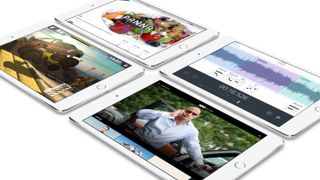
1. New iPad (2017)

The best iPad, giving you plenty of power and bang for your buck

Weight: 469g | Dimensions: 240 x 169.5 x 7.5 mm | OS: iOS 10 | Screen size: 9.7-inch | Resolution: 1536 x 2048 pixels | CPU: A9 | RAM: 2GB | Storage: 32GB/128GB | microSD slot: No | Battery: approx 8,800mAh | Rear camera: 8MP | Front camera: 1.2MP

2. iPad Pro 10.5

A bigger and better version of the Pro

Weight: 469g | Dimensions: 250.6 x 174.1 x 6.1 mm | OS: iOS 10 | Screen size: 10.5-inch | Resolution: 1668 x 2224 pixels | CPU: A10X | RAM: 4GB | Storage: 32GB/256GB/512GB | microSD slot: No | Battery: TBC | Rear camera: 12MP | Front camera: 7MP

Samsung Galaxy Tab S2

3. Samsung Galaxy Tab S3

A top-notch iPad Pro rival

Weight: 429g | Dimensions: 237.3 x 169 x 6mm | OS: Android 7 | Screen size: 9.7-inch | Resolution: 1536 x 2048 | CPU: Snapdragon 820 | RAM: 4GB | Storage: 32GB | Battery: 6,000mAh | Rear camera: 13MP | Front camera: 5MP

iPad Pro 9 7

4. iPad Pro 9.7

A brilliant tablet that brings power to portability

Weight: 437g | Dimensions: 240 x 169.5 x 6.1 mm | OS: iOS 10 | Screen size: 9.7-inch | Resolution: 1536 x 2048 pixels | CPU: A9X | RAM: 2GB | Storage: 32GB/128GB/256GB | microSD slot: No | Battery: TBC | Rear camera: 12MP | Front camera: 5MP

iPad mini 4

5. iPad mini 4

The best small-screen tablet

Weight: 299g | Dimensions: 203.2 x 134.8 x 6.1mm | OS: iOS 10 | Screen size: 7.9-inch | Resolution: 1536 x 2048 | CPU: Dual-core 1.5 GHz | RAM: 2GB | Storage: 128GB | Battery: 5124mAh | Rear camera: 8MP | Front camera: 1.2MP

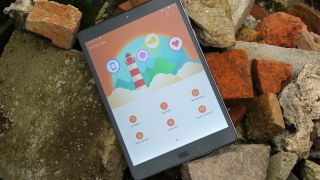
6. Asus ZenPad 3S 10

One of the best new Android tablets out

Weight: 430g | Dimensions: 240.5 x 163.7 x 7.2 mm | OS: Android Marshmallow | Screen size: 9.7-inch | Resolution: 1536 x 2048 | CPU: Mediatek MT8176 | RAM: 4GB | Storage: 32GB/64GB | Battery: up to 10 hours | Rear camera: 8MP | Front camera: 5MP

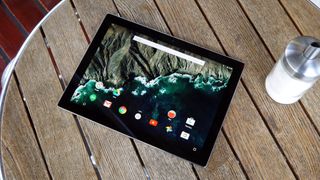
7. Google Pixel C

The best Android tablet (if you ignore the price)

Weight: 517g | Dimensions: 242 x 179 x 7mm | OS: Android Nougat | Screen size: 10.2-inch | Resolution: 2560 x 1800 | CPU: Tegra X1 | RAM: 3GB | Storage: 32GB/64GB | Battery: up to 10 hours | Rear camera: 8MP | Front camera: 2MP

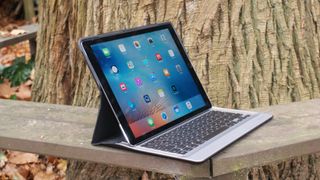
8. iPad Pro 12.9

Apple’s biggest slate isn’t its best, but it’s not far off

Weight: 713g | Dimensions: 305.7 x 220.6 x 6.9mm | OS: iOS 10 | Screen size: 12.9-inch | Resolution: 2048 x 2732 | CPU: Dual-core 2.26 GHz | RAM: 4GB | Storage: 32GB/128GB | Battery: 10,307mAh | Rear camera: 8MP | Front camera: 1.2MP

Microsoft Surface Pro 4

9. Microsoft Surface Pro 4

The Windows tablet that can replace your Windows laptop

Weight: 766g/786g | Dimensions: 292.10 x 201.42 x 8.45mm | OS: Windows 10 Pro | Screen size: 12.3-inch | Resolution: 2,736 x 1,824 | CPU: Various | RAM: 4GB/8GB/16GB | Storage: 128GB | Battery: up to 9 hours | Rear camera: 8MP | Front camera: 5MP

10. iPad mini 2

A great tablet but a little old

Weight: 331g | Dimensions: 200 x 134.7 x 7.5 mm | OS: iOS 10 | Screen size: 7.9-inch | Resolution: 1536 x 2048 | CPU: Dual-core 1.3 GHz | RAM: 1GB | Storage: 16/32/64/128GB | Battery: 6470 mAh | Rear camera: 5MP | Front camera: 1.2MP


iPhone 8 Rumor: Apple may add wireless charging  but top-end model could cost $1,000

iPhone 8 Rumor: Apple may add wireless charging but top-end model could cost $1,000

There are rumors swirling around the iPhone 8 suggesting Apple could be planning to offer a major technology leap forward with its 10th Anniversary iPhone, but the highest-end devices may not be cheap.

Business Insider has published a pair of rumors on various aspects of the upcoming iPhone 8. KGI Securities analyst Ming-Chi Kuo Apple will move back to all-glass construction with the iPhone 8 for all three models. The use of glass could make it more difficult to implement the wireless charging support Kuo expects the new device to offer, and overheating could be a problem due to the difference in thermal dissipation between glass and metal. Kuo writes:

Adoption of glass casing & wireless charging unfavorable to thermal system operation for three new 2017F iPhone models; bigger impact on OLED model. The thermal system becomes less efficient with glass casing, as compared to metal casing used previously. Furthermore, wireless charging increases handset temperature. While we don’t expect general users to notice any difference, lamination of an additional graphite sheet is needed for better thermal control and, thus, steady operation; this is because FPCB is replaced with film, which is more sensitive to temperature change of the 3D touch sensor in OLED iPhone.

Kuo suspects that Apple can solve this problem by adding the aforementioned graphene sheet, but that it could increase the cost of the OLED panel by as much as 50%. That brings us to our second rumor. Scuttlebutt suggests the top-end iPhone 8 with an OLED display, wireless charging, and a 5.8-inch screen could hit $1,000 or even more. Mark Sullivan of Fast Company agrees with Kuo on this point. Sullivan expects the iPhone 8 (or iPhone X) to offer more RAM, more storage, and possibly higher clock speeds than other Apple devices.

The iPhone 8/X is also expected to offer home buttons and fingerprint sensors built directly into its edge-to-edge screen, a double camera, and 3D-sensing technology provided by Lumentum. Companies like Amazon and Google have played with 3D-sensing technology to varying degrees, and the tech could be useful in augmented reality and virtual reality applications.

Now, keep in mind, that $1,000+ price tag is strictly for the premium model. There would be three smartphones in total: A 4.7-inch model (iPhone 7s), a 5.5-inch model (iPhone 7s Plus) and the 5.8-inch iPhone 8 or iPhone X with higher specs wherever possible. Apple has supposedly tied up OLED suppliers and is working on integrating a much larger battery into the iPhone 8/X. The company is also expected to use both Intel and Qualcomm modems. (more…)

PLAY VIRTUAL DRUMS WITH FREEDRUM

PLAY VIRTUAL DRUMS WITH FREEDRUM

Philip Robertson is a keen drummer and like any musician knows the importance of practice.

But rather than heading for a rehearsal studio he sits down in the middle of Malmo in Sweden to make a racket.

He is the project leader of Freedrum, a virtual reality drum kit that can be carried in a back pocket.

All that’s needed is an app on a tablet or smartphone and sensors strapped to the drummer’s sticks and feet.

The sensors detect the drummer’s movements and instantly trigger different drum sounds.

“Because the sensor understands the angle of where the drumsticks are pointing in, we’re able to understand which drum is being hit at what point in time and also the intensity of the drum as well. So, I can play it quite soft, or I can play it quite hard,” explained Philip Robertson.

The idea came to the inventor when his ten-year-old son wanted to learn drums.

The real challenge was accurately detecting a drummer’s movements and correctly interpreting them into hits on a drum kit.

“We use a gyroscope and a gyroscope tracks the velocity, the angular velocity, how fast somebody turns, something turns. And it integrates this, so if you do it slightly wrong, you will end up like here instead or it might drift. So, then suddenly your drum kit is about here. So, we kind of have to recalibrate this automatically with some smart algorithms,” explained the inventor August Bering.

That’s translated into an electrical musical signal, called ‘MIDI’ (Musical Instrument Digital Interface) which is sent via Bluetooth to the connected app. The sensors can be used with any drumsticks.

In December last year, Freedrum successfully completed an online crowdfunding campaign on website Kickstarter and raised over 584,000 euros.

The initial difficulty say developers is for beginners to find the virtual drums which is unlike playing with a drum kit in front of you.


ALIENWARE ALPHA R2 REVIEW

ALIENWARE ALPHA R2 REVIEW

Blowing off Steam turns Alienware’s tiny Alpha into a dream machine

alienware alpha r review

HIGHS

  • Solid 1080p performance
  • Compact, sturdy design
  • Decent price point
  • Highly upgradable
  • No more SteamOS

alienware alpha r review

LOWS

  • Runs hot and loud
  • SSD upgrade is a must

alienware alpha r review

Alienware’s first Alpha systems were the poster boy for the Steam Machine project. A well-known gaming company, producing a first-rate machine, with everyone’s favorite platform – what’s not to love?

Well, as it turned out, quite a bit. The Linux-based OS suffered from limited game compatibility, followed by reports of slower performance when running games on SteamOS than on Windows. The previous Alpha generations only offered a single GPU, simply described as a “Geforce GTX GPU” which, while attractive to console gamers looking for simpler options, didn’t satisfy PC gamers.

Now the Alpha is back with a full-blown GTX 960, 6th-gen Intel Core processor, and an improved outlook on life. Our review unit was powered by the Intel Core i7-6700T with 8GB of RAM, the aforementioned GTX 960, and a 1TB mechanical drive, all for $949. With the Alienware X51 officially retired, and SteamOS replaced by Windows, is this the Alpha’s time to shine?

Size matters

While the internals have changed dramatically, the exterior hasn’t changed at all. The Alpha is still a squat, square box with a single beveled front corner. It’s noticeably smaller than a current-gen console, at just eight inches deep and wide, and its understated design will look right at home next to a TV or stereo equipment.

alienware alpha r review

It’s an Alienware product, which means RGBLED lighting is standard, both on the Alienware logo / power button, and on the front corner. Users can change them at will, coordinate them with games, or shut them off altogether using bundled software.

Overall, the build quality is high enough to meet the standards we have for Dell’s gaming brand. It overcomes the cheap plastic feel that’s so common among small systems. It’s still no match for full custom rigs like the Origin Chronos, but given the Alpha’s price, we don’t expect it to compete on that level.

Last year’s plugs

The Alpha has five USB ports in total — a pair of 3.0 in the front, another pair in the back, and a 2.0 port hidden underneath a panel on the bottom of the Alpha – a perfect spot for a wireless keyboard, mouse, or controller adapter. The back also features an Ethernet port, optical audio out, and a proprietary connection for the Alienware Graphics Extender, should you want a beefier graphical option.

alienware alpha r review

Compared to even smaller systems like the Intel Skull Canyon NUC, the connectivity available is expansive, if not a little archaic. The distinct lack of DisplayPort and Type-C or Thunderbolt is more noticeable in 2016 than in previous years. Since Alienware reconfigured connections for this version, it would’ve been nice if they had found room for something a little more cutting edge.

While the wired connectivity falls behind systems with more traditional motherboards, the Alpha makes up for it with wireless connections. An 802.11ac card is standard, with the option to upgrade to a 2×2 card for just $25. Bluetooth 4.2 is included, too.

Cramped, but accessible

Taking apart the Alpha is simple enough. Only four screws hold the case to the Alpha’s internals, and with a little prying that shell clicks away, leaving just the internals in a metal frame. Accessing the memory means removing the CPU’s fan shroud, easy enough thanks to some tool-less clips.

alienware alpha r review

Once it’s off, a small heatsink covers the CPU. Remove it, and you’ll find a standard chip, which can be upgraded to any LGA1151 chip (though, give the size of the Alpha, you’d be wise not to try stuffing in a Core i7-6700K).

The hard drive is on the underside, with a quartet of screws holding it in. Unfortunately, Alienware’s use of more common hardware doesn’t extend to the GPU, the only component inside permanently attached to the motherboard.

Still, we have to give Alienware points for making sure the rest of the parts are accessible, and the CPU can be upgraded – a rarity in systems this small.

A surprisingly quick chip

The Core i7-6700T is the beating heart of our review unit. It’s quad-core chip with Hyper-Threading, a 2.8GHz base clock, and 3.6GHz Turbo Boost. The only caveat is a limited 35 watt thermal design power (TDP). As a reference, the full-power Core i7-6700 has a 3.4Ghz base clock, and a 65 watt TDP. The Core i7-6700K is clocked at 4GHz, and has a 91 watt TDP. In demanding tests, especially over time, the Alpha is bound to fall behind.

Or not. Much to our surprise, the Alpha R2 manages to keep pace with other compact systems in its wake, and even competes with much more powerful chips like the non-overclocked Core i7-6700K in the iBuyPower Revolt 2.

Its single-core speeds suffer a bit, as seen in the GeekBench test, but in well-threaded loads it has no issue, tying the iBuyPower’s result. It converts a 4K movie trailer using Handbrake within six seconds of both the Revolt 2 and the Razer Blade, which are powered by the Core i7-6700K and Core i7-6700HQ, respectively.

The low-power 6th-generation Core CPU in the Alpha R2 is the little chip that could, and not nearly as much of a compromise as we worried it might be.

alienware alpha r review

Move on from mechanical

The sole hard drive in our review unit is, unfortunately, a 7,200RPM mechanical drive. It’s one terabyte capacity is some consolation. Who knows? Maybe it will surprise us like the CPU did.

In case it isn’t abundantly clear, the mechanical drive’s results are bad. The drive in the Alpha basically tied with mid-range portable USB drives, and it’s a far cry from eSATA SSDs found in most machines, let alone the PCIe drives that are becoming the standard.

The tortoise-like drive adversely affects everyday use, to say the least. We’re so used to SSD-fueled systems booting up immediately that it’s almost confusing when the Alpha takes it sweet time starting Windows.

Pin It on Pinterest