
Lost or deleted an important file? These five free file recovery tools could help you get it back
The best free file recovery software
File recovery can be an expensive business, which is why it’s no substitute for backing up your key documents, photos and other data on a regular basis. But that’s of little comfort to anyone – even those with good backup regimens – who suddenly find themselves confronted by the stomach-churning feeling of data loss.
Whether it’s a virus infection, a hardware failure, or just human error, it’s all too easy to lose vital files. As soon as you’ve become aware of data loss, it’s critical you stop using the drive affected immediately. Whether the drive itself is failing or you’ve simply deleted a file accidentally, this is the golden moment when you may be able to get your data back before it’s gone for good.
We’ve cherry-picked five of the best free data recovery tools in the business. Just pick the one closest to your requirements and with a bit of luck (and no small measure of help from the app involved), you could yet save your files.
1. Recuva
With a simple wizard and advanced recovery scans, Recuva is the tool you need in an emergency
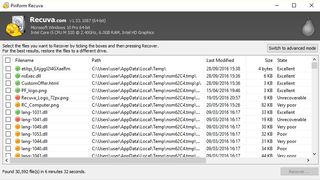
Recuva makes things as easy and stress-free as possible. It opens by default to a file recovery wizard, which advanced users can subsequently skip: from here, choose the type of file you’re trying to recover (picture, documents, compressed, emails and all files are among those on offer) and it’ll focus its search accordingly.
You can target your search to a specific location or search all your drives, and you can opt to choose a quick or deep scan. The latter takes much longer, but flushes out more results. Then click ‘Start’ and wait for the scan to complete.
Once done, your results are presented, with each recovered file given a rating depending on its condition. You can recover files direct from here or switch to Advanced Mode for a frankly better view, offering file preview, information and a peek at the file’s header.
Download here: Recuva

